View TSC MB241T 4-Inch Performance Industrial Printer Series
Australian warehouse and manufacturing operations are being offered newer print-and-apply systems for cold-store and logistics environments, with growing emphasis on traceability, code verification and reliable line operation. For businesses planning pallet or outer-case labelling, the decision is not simply whether to automate: it is whether the label construction, data format, application point and printing platform suit the handling conditions and operational volume.
Printer Power can help Australian organisations assess a supported labelling workflow for dispatch, storage and traceability requirements. The right choice starts with the operational outcome required at receiving and dispatch, then works back to the label, print method, output handling and management needs.
1. Start with the pallet-labelling requirement
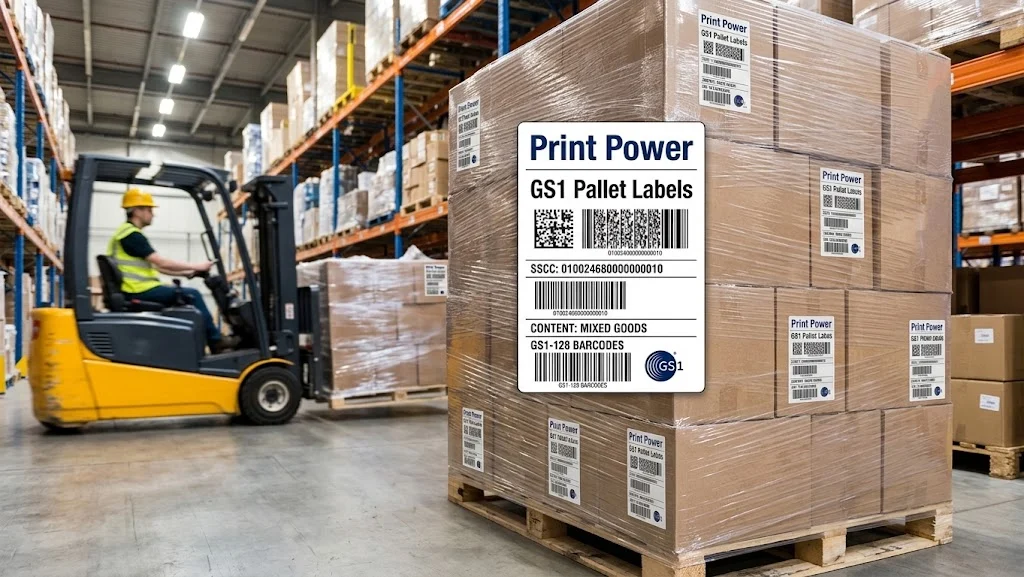
Print-and-apply is most relevant when a warehouse, cold store, or production line needs repeatable application of variable pallet, carton, or shipment information at an established point in the process. Typical label content can combine machine-readable barcode data with human-readable shipment, serial, stock, or destination information. This supports both scanner-based handling and manual identification through receiving, storage, and dispatch.
To ensure global supply chain compliance, operations frequently rely on standardized GS1 pallet labels featuring Serial Shipping Container Codes (SSCC) and GS1-128 barcodes. Utilizing specialized software like BarTender streamlines this requirement by providing built-in GS1 Application Identifier (AI) wizards and pre-formatted GS1 templates. This eliminates manually formatted data errors and guarantees that variable shipping, batch, and expiry information strictly adheres to GS1 standards across all barcode generations.
Buyers should define four requirements before comparing equipment:
-
Identification purpose: Determine what the label must identify, such as a pallet, outer case, shipment, or internal process unit, and which data must remain readable through the workflow.
-
Application environment: Consider package surface, temperature range, moisture exposure, abrasion, storage duration, and the point at which the label is applied.
-
Label position and accessibility: Plan where labels will be applied so they can be scanned in normal handling and storage orientations. Applying equivalent pallet information on two accessible sides can reduce the risk of a label being obscured.
-
Throughput and change frequency: Assess whether the operation benefits from on-demand printing, repeatable label placement, and automated handling rather than manual labelling.
Barcode readability should be treated as an operating requirement. Label size, barcode dimensions, data content, and the available package area all influence whether a label can be scanned reliably in its intended environment.
2. Match label material and print method to handling conditions
The label is a complete construction, not merely a chosen size. Face stock, adhesive, and liner should suit the package surface, expected temperatures, handling exposure, and the period for which information needs to stay legible. This is especially important for cold-store and logistics workflows, where moisture, handling, and storage conditions can affect practical label performance.
Direct-thermal printing can be a practical choice for short-lived labels in relatively dry, low-abrasion workflows because it uses heat-sensitive media without a ribbon. Thermal-transfer printing uses a ribbon and is generally considered where labels need greater resistance to smudging, scratching, moisture, or chemical contact. The appropriate approach depends on the required label life and exposure, rather than on the printer alone.
For thermal-transfer workflows, wax/resin ribbon is a relevant consumable category to assess alongside the selected label construction. A ribbon choice should support the operational durability required of the finished label; it should not be selected solely because it fits a general warehouse use case.
3. Decide whether an industrial printing platform fits the workflow
An industrial printer is suited to organisations that need a durable, on-demand platform for varied operational labelling. The TSC MB241T 4-Inch Performance Industrial Printer Series is a supporting example: it is an industrial thermal-transfer range for transport, logistics, manufacturing, retail, and healthcare labelling. Its full-metal print mechanism, adjustable thermal printhead pressure, and heating-line adjustment are relevant where teams use differing media types and seek consistent label output.
The MB Series can handle specialised media including firmer or thicker hangtags, which may matter in mixed-media environments. For constrained work areas, MB241 Series models use a bifold media door designed to reduce operating-space requirements by 24 per cent while allowing access for media and ribbon changes.
Configuration should follow the workflow rather than being treated as a default purchase:
-
203 dpi vs. 300 dpi: The series includes 203 dpi MB241T configurations and 300 dpi MB341T configurations. Buyers needing finer print resolution (such as high-density 2D GS1 barcodes) should assess a 300 dpi MB341T configuration; buyers whose workflow needs standard 203 dpi output can consider an MB241T configuration.
-
Output handling: Selected configurations are available with a cutter, peel-off function, 5-inch internal rewinder, or MFi Bluetooth option.
For example, MB241T-A001-0014 is the 203 dpi configuration with a 2.3-inch LCD and peel-off option, while MB341T-A001-0024 is a 300 dpi configuration with a 3.5-inch touch LCD and cutter. These are distinct configurations, so the required resolution, interface, and output handling should be selected together rather than added as assumptions after purchase.
4. Weigh software automation, fleet administration, and operational trade-offs
Enterprise Barcode & Print Automation
Hardware is only as responsive as the software driving it. To achieve true high-throughput print-and-apply automation, integrating BarTender Automation Edition enables seamless server-side print automation without human intervention. BarTender Integration Builder can trigger print jobs automatically from existing ERP, WMS, or MES databases (such as SAP, Oracle, or Microsoft Dynamics) via REST APIs, file drops, or database watches.
By incorporating BarTender Automation, operations can dynamically populate dynamic GS1 barcode fields, print conditionally based on real-time order status, and route print jobs to specific TSC MB Series printers across the warehouse floor automatically.
Hardware & Fleet Administration
For multi-printer or multi-location environments, administration is critical. The MB Series supports automatic switching between printer-language emulations, which simplifies replacement or upgrade projects by reducing the need to alter established print commands and label templates. TSC Standalone Creator, TSCPRTGo, SOTI Connect, and TSC Console provide tools for template access, extended mobile display, and printer-group administration. Applicable MB241 Series models also offer an embedded web-management interface for remote configuration, monitoring, and troubleshooting of an individual printer.
Workflow Trade-offs & Sustainability
The trade-off is that greater flexibility requires clearer upfront specification. Businesses considering linerless printing, RFID-related capability, peel-off, cutting, or rewinding should identify the required function as part of the initial workflow decision. These options address different operational needs and are not interchangeable. Organisations also need to distinguish between a printer selected for on-demand industrial labels and a complete print-and-apply solution, which adds application hardware and line-integration considerations.
Sustainability may also influence the platform decision. The MB241 Series is described as using recyclable packaging and casing, with more than 90 per cent of printer components described as recyclable. An optional linerless kit provides a pathway for operations evaluating linerless label printing.
Purchase decision: when this approach is the right fit
Australian operations should consider a print-and-apply workflow when pallet or carton labels need repeatable, on-demand information and consistent application within a defined logistics, cold-store, or manufacturing process. The strongest fit is an operation that has documented its data requirements, package surfaces, environmental exposure, label placement, and expected handling volume.
The combination of BarTender Automation Edition for compliant GS1 label generation and database integration alongside the TSC MB241T 4-Inch Performance Industrial Printer Series offers a complete solution when the requirement is durable thermal-transfer label production with robust automation. It is less suitable as a simple one-size-fits-all answer where the label material, application equipment, code format, or output-handling requirement has not yet been determined.
Contact our team to discuss a Print Power labelling workflow that aligns label media, software automation, and operational hardware requirements.
Find the Right Product
Contact our team to discuss a Printer Power labelling workflow for pallet, carton, cold-store or logistics identification requirements.